SideType — keyboard
Predictive typing in your language, on the Compact QWERTY tile.
What it’s for
The tile in your hands only knows English. SideType teaches it every other language.
Sidephone’s own keyboard for the tile, JakeType, is good, but it only types English. No å, ä, ö, é, ü, ñ or ç. I write Finnish every day, and without ä and ö the tile could not keep up with how I type. So I built the keyboard I needed, then kept adding languages until it covered every Latin script I could find a dictionary for.
On a keyboard with two letters per key, the prediction is the keyboard. Half the keys of a normal layout means every press is ambiguous, so everything rests on how well it guesses. That is hard to do well in one language. SideType does it in more than thirty, each with its own words, spelling and accents.
How the typing works
If you have never used a two-letters-per-key keyboard, this is how it works.
Each key carries two letters. The top-left one is Q W. When you press it, SideType does not choose between q and w; it keeps both, and as you keep typing it matches the whole pattern against real words and shows what fits, likeliest first.
Typing “test”: press T Y, then E R, then A S, then T Y. By the fourth key, “test” is at the top of the list. Press space to take it. You never told it which letter you meant; the prediction worked it out.
Accents ride along. Accented letters do not get their own keys; they live on the key of their base letter. In Finnish, ä and å sit on A S, and ö sits on O P. Type the keys for “tyo” and you get “työ”, because that is the real word, so the spelling comes out right without you doing anything about it.
When it guesses wrong, press the same key again to step through its letters by hand, or scroll the list with the arrows.
What it does
- Predictive typing on the Compact QWERTY tile: press the keys for the word, take the suggestion with space.
- Real accented letters, å ä ö é ü ñ ç and the rest, on the keys they belong to, with no special key to hunt for.
- 30+ languages, every Latin script, switchable from the keyboard itself.
- Offline voice input for English (US and UK), German, French and Spanish. It runs on the phone; nothing you say leaves it, and it works with no signal. Each language is a one-off download of about 40 MB, only if you say yes.
- Numbers and symbols without a mode switch: hold a letter key for the small character printed on it.
- Emoji pinned to the keys you choose. Hold SYM and press the key to drop one in.
- A personal dictionary for names, slang, and words it has not met.
- The network is used for one thing only, fetching a dictionary or voice model you asked for. See Privacy below.
Screenshots

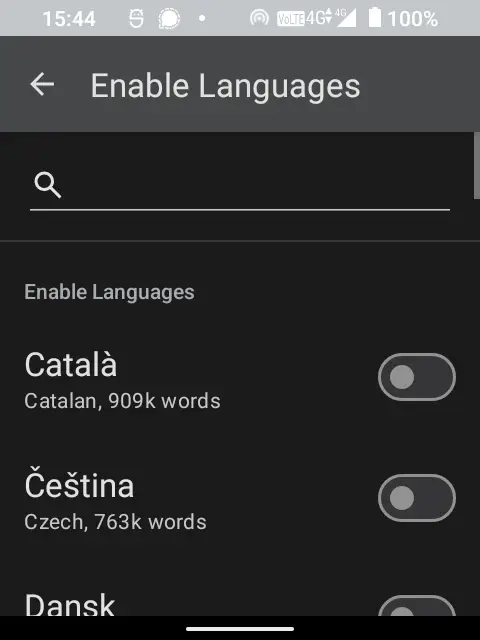
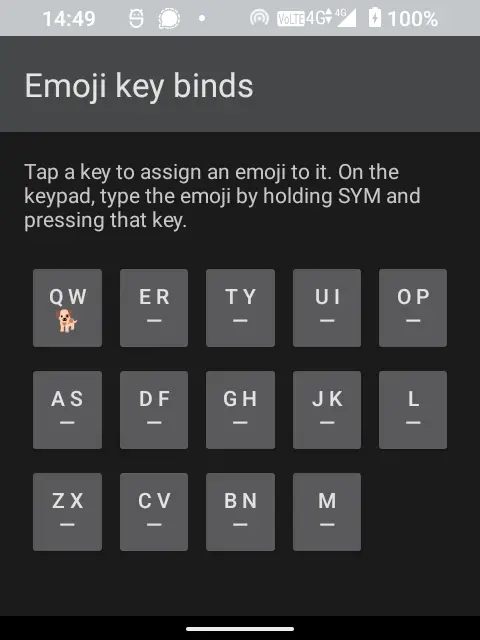
Setup
- Install it, then open Settings → System → Languages & input → On-screen keyboard and enable SideType. (The wording moves around a little between Android versions.)
- Switch to SideType from the same screen.
- Pick your language. It loads that dictionary once. You will see a short “Loading…” the first time and never again.
- Enable a second language if you write in more than one. The language chip on the strip then hops between them; long-press it to open Settings.
SideType installs alongside your other keyboards and removes nothing. JakeType stays exactly where it was, and switching back is two taps.
Privacy
Nothing you type or say leaves the phone, and there is nothing in the app that tracks you, profiles you, or asks you to sign in. SideType downloads two kinds of file, a language dictionary and a voice model, and only when you ask it to, after showing you the size.
Honestly
It is an early release, and the rough edges are in the languages.
The key layouts and accent placements were generated for every Latin-script language and checked automatically at build time, but only English, Finnish and German have been typed out by hand. Your language might have an accent on the wrong key or a prediction that feels off. If you hit one, please report it: these are usually a one-line fix.
Finnish has no voice input, and I cannot fix it. Vosk, the open-source engine SideType uses, publishes no Finnish model at any size, and the same goes for Norwegian and Danish. The alternatives that do cover Finnish need far more phone than the SP-01 has: the one I measured took fifteen seconds to load and 783 MB of RAM on this hardware. That is the limitation I mind most, since Finnish is why SideType exists at all. Swedish is on hold rather than ruled out. Its only model is 303 MB, seven times the others, with accuracy its authors have not measured.
Russian, Greek, Arabic, Hindi and Vietnamese are not there yet. The dictionaries are already bundled; each one needs a key layout drawn up. It is a contained job if you would like to do one for your language.
For developers
SideType is a fork of Traditional T9, which already did the hard part for the classic 12-key numeric pad: dictionary matching and n-gram ranking for 40+ languages. SideType widens the engine’s key encoding from 12 keys to 16, adds a Compact QWERTY input mode for the tile’s 14 letter keys and its Shift, SYM and arrow keys, and gives every language a layout that places its accents on the keys of their base letters. Adding a Latin language is usually a data change, not a code change.
Build instructions, the layout format, and the architecture are in the repo.
Install SideType
The SideSuite app pack. Scan this in your phone’s Library app and all the SideSuite apps appear in your library. You choose which ones to install, and updates then arrive on their own without you tapping through anything.
Just SideType, on its own
If you only want this one, download the signed APK from its releases and open it on the phone. You will not get update notifications this way; Obtainium is the middle option if you want those without the pack.